Breaking News

Receive all updates via Facebook. Just Click the Like Button Below...

Showing posts with label google. Show all posts

November 9, 2013

Things To Do Before Applying For Adsense

    Things To Do Before Applying For Adsense


In this post, I am turning my head towards a new thing. That is "Adsense".

What Is Adsense ? 

Google AdSense is a program run by Google Inc. that allows publishers in the Google Network of content sites to serve automatic text, image, video, and rich media adverts that are targeted to site content and audience. These adverts are administered, sorted, and maintained by Google, and they can generate revenue on either a per-click or per-impression basis. Google beta-tested a cost-per-action service, but discontinued it in October 2008 in favor of a DoubleClick offering (also owned by Google).  In Q1 2011, Google earned US$2.43 billion ($9.71 billion annualized), or 28% of total revenue, through Google AdSense.
source : www.wikipedia.org

Google Adsense is an ad providing program from Google. You can get dollars per impressions and click on ads. But getting adsense approval is not so easy in the present days. So your website needs to well designed for adsense approval.

Today, I am describing how to arrange your blog for getting adsense approved. For this you have to do many things. I will describe about 15 of that. Just please do these and wait for my next post.  The main points to keep in mind are :


  • Add Meta Tags
  • Length Of Posts
  • Site Traffic
  • Google Widgets
  • Pages
  • Domain
  • Invalid Content
  • Webmaster Quality Guidelines
  • DMCA Badge [ optional ]
  • Chat-boxes
  • Copy Content 
  • Posts
  • Age Of Domain

Adding Meta Tags

You have to add the meta tags for better traffic. But you have to add only the necessary ones into your template. If you had added any meta tags or if you haven't added [ add below <head> of your template], check with this code :
<meta content='YOUR BLOG TITLE' name='title'/>
<b:if cond='data:blog.metaDescription != &quot;&quot;'>
  <meta expr:content='data:blog.metaDescription' name='description'/>
</b:if>
<b:if cond='data:blog.url == data:blog.homepageUrl'> <meta content='YOUR BLOG DESCRIPTION' name='description'/></b:if>
<meta content='KEYWORDS HERE' name='keywords'/>
<meta content='AUTHOR NAME' name='author'/>
<meta content='INDEX,FOLLOW' name='robots'/>
<meta content='index, follow' name='googlebot'/>
<meta content='text/html; charset=UTF-8' http-equiv='content-type'/>


  • Replace this with your Blog Title : YOUR BLOG TITLE
  • Replace this with your blog description :  YOUR BLOG DESCRIPTION
  • Replace this with keywords [ each one separated by a comma and not too much ] : KEYWORDS HERE
  • Replace this with the author name : AUTHOR NAME


Other bold texts need not be changed.


Length Of Posts

  • Every posts must exceed a length of approximately 750 words or more ]. If your posts are not exceeding this limit, Google will say that your posts are of short lengths.
  • And also, check for major grammar mistakes.

Site Traffic

When you are going to submit your site to adsense, your site traffic might exceed a limit of 300. [ When my adsense account got approved, it was above 5000].
The site traffic can be divided into two : 
  1. Organic Traffic.
  2. Inorganic traffic.

Organic Traffic

Organic traffic means the traffic that you get from search engines and that comes directly to your site.

Inorganic traffic

Inorganic traffic means the traffic that you get from social media like [ Google plus, Facebook, Twitter etc.]

Google Widgets

Its better to use the google widgets on your blog. That includes add to circles widget and the +1 button.

Pages

There are some must required pages for your site or blog. That includes these main things :
  • Contact Us
  • Disclaimer
  • Privacy Policy

Contact Us

You can create a free contact us for at : www.foxyform.com/

Disclaimer

You have to create a disclaimer page like mine.

Privacy Policy

Visit this url for creating a provicy policy that comes across the policies of Adsense : http://www.serprank.com/privacy-policy-generator/

Domain

You have to change your web address www.yoursite.blogspot.com into www.yoursite.com.
You can choose any of these for blog into a paid domain : 

  • www.bigrock.com
  • www.hostgator.com
  • www.godaddy.com

Invalid Content

Check every post for any invalid content.

Google Webmaster Tools

First of all, you have to submit your website to Google webmaster tools.

Submit Sitemap : 

You just submit the sitemap to your Google webmaster tools and to make sure that every pages had been indexed by Google. If you have any doubts in submitting sitemap, please use the comment box.

Meet With Webmaster Quality Guidelines

You have to read this article from Google and make your website agrees with these quality guidelines : 
Some include adding alt tags and robots.txt files.

DMCA Badge [ OPTIONAL]

You have to protect your content from being copied. So you have to add the DMCA badge to your site.

visit the site;    http://www.dmca.com

Chat Boxes

Don't add any chat boxes on your blogger. Because according to Google, it is a form of policy violation. The reason behind is that you can force users to click on ads while chatting.

Copy Content 

You should not post any copy content on your blogger or website. In case you have a copy content, provide the source of the content.

Posts

You should have at least 100 posts or articles on your blogger/website.

Age Of Domain

According to Google policies, your website must be 6 months old. In case if your are having massive traffic and totally unique posts on your blog, you will get adsense approved before 6 months.

Conclusion

After doing all these things, give me your website address here. I will say that is it ready for getting approved by  adsense.

source;-netinfoz

  If at all, you are having any doubt regarding this topic that I had mentioned : 
You Must Use The Comment Box
Read more ...

October 15, 2013

Google GLΛSS

Google GLΛSS


Google Glass (styled "GLΛSS") is a wearable computer with an optical head-mounted display (OHMD) that is being developed by Google in the Project Glass research and development project, with a mission of producing a mass-market ubiquitous computer. Google Glass displays information in a smartphone-like hands-free format, that can communicate with the Internet via natural language voice commands.

    While the frames do not currently have lenses fitted to them, Google is considering partnerships with sunglass retailers such as Ray-Ban or Warby Parker, and may also open retail stores to allow customers to try on the device. The Explorer Edition cannot be used by people who wear prescription glasses, but Google has confirmed that Glass will eventually work with frames and lenses that match the wearer's prescription; the glasses will be modular and therefore possibly attachable to normal prescription glasses.

Glass is being developed by Google X, which has worked on other futuristic technologies such as driverless cars. The project was announced on Google+ by Project Glass lead Babak Parviz, an electrical engineer who has also worked on putting displays into contact lenses; Steve Lee, a product manager and "geolocation specialist"; and Sebastian Thrun, who developed Udacity as well as worked on the autonomous car project. Google has patented the design of Project Glass. Thad Starner, an augmented reality expert, is a technical lead/manager on the project.

Development

Although head-worn displays for augmented reality are not a new idea, the project has drawn media attention primarily due to its backing by Google, as well as the prototype design, which is smaller and slimmer than previous designs for head-mounted displays. The first Glass demo resembles a pair of normal eyeglasses where the lens is replaced by a head-up display. Around August 2011, a Glass prototype weighed 8 pounds; the device is now lighter than the average pair of sunglasses. In the future, new designs may allow integration of the display into people's normal eyewear.
     According to several Google employees, the Glass was initially projected to be available to the public for "around the cost of current smartphones" by the end of 2012, but other reports stated that the Glass was not expected to be available for purchase by then.


Hardware

Camera

Google Glass has the ability to take photos and record 720p HD video. While video is recording, the screen stays on.

Touchpad

A touchpad is located on the side of Google Glass, allowing users to control the device by swiping through a timeline-like interface displayed on the screen. Sliding backward shows current events, such as weather, and sliding forward shows past events, such as phone calls, photos, circle updates, etc.

Technical specifications

For the developer Explorer units:

  • Android 4.0.4 and higher
  • 640×360 display
  • 5-megapixel camera, capable of 720p video recording
  • Wi-Fi 802.11b/g
  • Bluetooth
  • 16GB storage (12 GB available)
  • Texas Instruments OMAP 4430 SoC 1.2Ghz Dual(ARMv7)
  • 682MB RAM 
  • 3 axis gyroscope 
  • 3 axis accelerometer
  • 3 axis magnetometer (compass)
  • Ambient light sensing and proximity sensor
  • Bone conduction transducer

other

 
Developer
   Google
Manufacturer
   Foxconn
Type Augmented reality (AR), Optical head-mounted display (OHMD), Wearable technology, Wearable computer
Release date Developers (US): February 2013
Consumers: 2014
Introductory price
Explorer version: $1500 USD
Consumer Edition: $300-500
Operating
system
Android 4.0.4
Power
Lithium Polymer battery (2.1 Wh)
CPU OMAP 4430 SoC, dual-core
Storage capacity 16 GB Flash total (12 GB of usable memory)
Memory 1GB RAM (682MB available to developers)
Display Prism projector, 640×360 pixels (equivalent of a 25 in. screen from 8 ft. away)
Sound
Bone conduction transducer
Input

Voice command through microphone, accelerometer, gyroscope, magnetometer, ambient light sensor, proximity sensor

Controller
 input
Touchpad, MyGlass phone app

Camera
Photos - 5 MP, videos - 720p

Connectivity
Wi-Fi 802.11b/g, Bluetooth, micro USB

Weight
50g

Backward
compatibility
Any Bluetooth-capable phone; MyGlass companion app requires Android 4.0.3 (Ice Cream Sandwich) or higher

Website
google.com/glass

Software

Applications (Glassware)

Google Glass applications (Glassware) are free applications built by third-party developers. Glass also uses many existing Google applications, such as Google Now, Google Maps, Google+, and Gmail.
Third-party applications announced at South by Southwest (SXSW) include Evernote, Skitch, The New York Times, and Path.
On April 15, 2013, Google released the Mirror API, allowing developers to start making apps for Glass. In the terms of service, it is stated that developers may not put ads in their apps or charge fees; a Google representative told The Verge that this might change in the future.
Many developers and companies have built applications for Glass, including news apps, facial recognition, photo manipulation, and sharing to social networks, such as Facebook and Twitter.
On May 16, 2013, Google announced the release of seven new apps, including reminders from Evernote, fashion news from Elle, and news alerts from CNN. Following Googles XE7 Glass Explorer Edition update in early July 2013, evidence of a "Glass Boutique", a store that will allow synchronization to Glass of Glassware and APKs, was noted.
Version XE8 made a debut for Google Glass on August 12, 2013. It brings an integrated video player with playback controls, the ability to post an update to Path, and lets users save notes to Evernote. Several other minute improvements include volume controls, improved voice recognition, and several new Google Now cards.

MyGlass

Google offers a companion Android app called MyGlass, which allows you to configure and manage your device.

Voice activation

Other than the touchpad, Google Glass can be controlled using "voice actions". To activate Glass, wearers tilt their heads 30° upward (which can be altered for preference) or tap the touchpad, and say "O.K., Glass." Once Glass is activated, wearers can say an action, such as "Take a picture", "Record a video", "Hangout with [person/Google+ circle]", "Google 'What year was Wikipedia founded?'", "Give me directions to the Eiffel Tower", and "Send a message to John (many of these commands can be seen in a product video released in February 2013). For search results that are read back to the user, the voice response is relayed using bone conduction through a transducer that sits beside the ear, thereby rendering the sound almost inaudible to other people.

Games

GlassBattle developed by BrickSimple and Escape developed by Advanced Mobile Applications (AMA Studios) are two Glass games that were released prior to the official release of the product. GlassBattle, which is adapted from the board game Battleship, was the first of the two to be publicized.

Safety concerns

Concerns have also been raised in regards to operating motor vehicles while wearing the device. West Virginia state representative Gary G. Howell has introduced an amendment to the state's law against texting while driving that would include bans against "using a wearable computer with head mounted display." In an interview, Howell stated, "The primary thing is a safety concern, it (the glass headset) could project text or video into your field of vision. I think there's a lot of potential for distraction."

Terms of service/policy


Under the Google Glass terms of service for the Glass Explorer pre-public release program, it specifically states, "you may not resell, loan, transfer, or give your device to any other person. If you resell, loan, transfer, or give your device to any other person without Google's authorization, Google reserves the right to deactivate the device, and neither you nor the unauthorized person using the device will be entitled to any refund, product support, or product warranty." Wired commented on this policy of a company claiming ownership of its product after it had been sold, saying: "Welcome to the New World, one in which companies are retaining control of their products even after consumers purchase them. Others pointed out that Glass was not for public sale at all, but rather in private testing for selected developers, and that not allowing developers in a closed beta to sell to the public is not the same as banning consumers from reselling a publicly released device.

Research

In July 2013, Lucien Engelen commenced research on the usability and impact of Google Glass in healthcare. As of August 2013, Engelen, who is based at Singularity University and in Europe at Radboud University Medical Center, is the first healthcare professional in Europe to participate in the Glass Explorer program. His research on Google Glass (starting August 9, 2013) was conducted in operating rooms, ambulances, a trauma helicopter, general practice, and home care as well as the use in public transportation for visually or physically impaired. Research contained making pictures, videos streaming to other locations dictating operative log, having students watch the procedures and tele-consultation through Hangout. Engelen documented his findings in blogs, videos, pictures, on Twitter, and on Google+. and is still ongoing.
The key findings of his research were:
  1. The quality of pictures and video are usable for healthcare education, reference, and remote consultation.The camera needs to be tilted to different angle for most of the operative procedures
  2. Tele-consultation is possible—depending on the available bandwidth—during operative procedures.
  3. A stabilizer should be added to the video function to prevent choppy transmission when a surgeon looks to screens or colleagues.
  4. Battery life can be easily extended with the use of an external battery.
  5. Controlling the device and/or programs from another device is needed for some features because of sterile environment.
  6. Text-to-speech ("Take a Note" to Evernote) exhibited a correction rate of 60 percent, without the addition of a medical thesaurus.
  7. A protocol or checklist displayed on the screen of Glass can be helpful during procedures.

The first time that the device was used in a U.S. surgery occurred in August 2013 at The Ohio State University Wexner Medical Center. Surgeon Dr. Christopher Kaeding used Google Glass to consult with a colleague in a distant part of Columbus, the state's capital city. A group of students at The Ohio State University College of Medicine also watched the surgery on their laptop computers. Kaeding stated following the procedure, "To be honest, once we got into the surgery, I often forgot the device was there. It just seemed very intuitive and fit seamlessly.

Read more ...

September 28, 2013

QR (Quick Response) Code

QR (Quick Response) Code


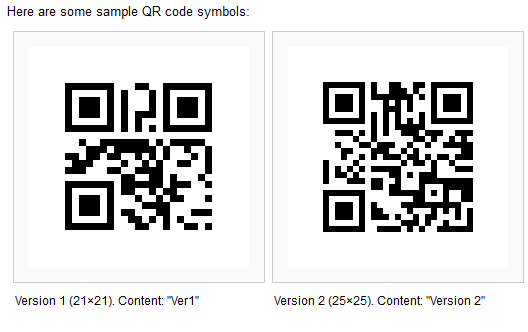
QR code (abbreviated from Quick Response Code) is the trademark for a type of matrix barcode (or two-dimensional barcode) first designed for the automotive industry in Japan. A barcode is an optically machine-readable label that is attached to an item and that records information related to that item. The information encoded by a QR code may be made up of four standardized types ("modes") of data (numeric, alphanumeric, byte / binary, Kanji) or, through supported extensions, virtually any type of data.
The QR Code system has become popular outside the automotive industry due to its fast readability and greater storage capacity compared to standard UPC barcodes. Applications include product tracking, item identification, time tracking, document management, general marketing, and much more.
A QR code consists of black modules (square dots) arranged in a square grid on a white background, which can be read by an imaging device (such as a camera) and processed using Reed-Solomon error correction until the image can be appropriately interpreted; data is then extracted from patterns present in both horizontal and vertical components of the image.

Invention

The QR code system was invented in 1994 by Toyota's subsidiary, Denso Wave. Its purpose was to track vehicles during manufacture; it was designed to allow high-speed component scanning. It has since become one of the most popular types of two-dimensional barcodes.

Standards

There are several standards that cover the encoding of data as QR codes:
  • 1 September 2006 – ISO/IEC 18004:2006 Information technology – Automatic identification and data capture techniques – QR code 2005 bar code symbology specification
    Defines QR code 2005 symbols, an extension of QR code model 2. Does not specify how to read QR code model 1 symbols, or require this for compliance.

At the application layer, there is some variation between most of the implementations. Japan's NTT DoCoMo has established de facto standards for the encoding of URLs, contact information, and several other data types. The open-source "ZXing" project maintains a list of QR code data types.

Uses

Originally designed for industrial uses, QR codes have become common in consumer advertising. Typically, a smartphone is used as a QR-code scanner, displaying the code and converting it to some useful form (such as a standard URL for a website, thereby obviating the need for a user to type it manually into a web browser).
"In the shopping industry, knowing what causes the consumers to be motivated when approaching products by the use of QR codes, advertisers and marketers can use the behavior of scanning to get consumers to buy, causing it to have the best impact on ad and marketing design." As a result, the QR code has become a focus of advertising strategy, since it provides quick and effortless access to the brand's website. Beyond mere convenience to the consumer, the importance of this capability is that it increases the conversion rate (that is, increases the chance that contact with the advertisement will convert to a sale), by coaxing qualified prospects further down the conversion funnel without any delay or effort, bringing the viewer to the advertiser's site immediately, where a longer and more targeted sales pitch may continue.
Although initially used to track parts in vehicle manufacturing, QR codes are now (as of 2012) used over a much wider range of applications, including commercial tracking, entertainment and transport ticketing, product/loyalty marketing (examples: mobile couponing where a company's discounted and percent discount can be captured using a QR code decoder which is a mobile app, or storing a company's information such as address and related information alongside its alpha-numeric text data as can be seen in Yellow Pages directory), and in-store product labeling. It can also be used in storing personal information for use by government. An example of this is Philippines National Bureau of Investigation (NBI) where NBI clearances now come with a QR code. Many of these applications target mobile-phone users (via mobile tagging). Users may receive text, add a vCard contact to their device, open a Uniform Resource Identifier (URI), or compose an e-mail or text message after scanning QR codes. They can generate and print their own QR codes for others to scan and use by visiting one of several pay or free QR code-generating sites or apps. Google had a popular API to generate QR codes, and apps for scanning QR codes can be found on nearly all smartphone devices.

QR codes storing addresses and Uniform Resource Locators (URLs) may appear in magazines, on signs, on buses, on business cards, or on almost any object about which users might need information. Users with a camera phone equipped with the correct reader application can scan the image of the QR code to display text, contact information, connect to a wireless network, or open a web page in the telephone's browser. This act of linking from physical world objects is termed hardlinking or object hyperlinking. QR codes also may be linked to a location to track where a code has been scanned. Either the application that scans the QR code retrieves the geo information by using GPS and cell tower triangulation (aGPS) or the URL encoded in the QR code itself is associated with a location.

Mobile operating systems

QR codes can be used in Google's Android, BlackBerry OS and Apple iOS devices (iPhone/iPod/iPad), as well as Microsoft's Windows Phone operating system, Google Goggles, 3rd party barcode scanners, and the Nintendo 3DS. The browser supports URL redirection, which allows QR codes to send metadata to existing applications on the device. mbarcode is a QR code reader for the Maemo operating system. In Apple's iOS, a QR code reader is not natively included, but more than fifty paid and free apps are available with both the ability to scan the codes and hard-link to an external URL. Google Goggles is an example of one of many applications that can scan and hard-link URLs for iOS and Android. BlackBerry 10 devices have a native QR reader as well as several third party readers. Windows Phone 7.5 is able to scan QR codes through the Bing search app.

URLs

URLs aided marketing conversion rates even in the pre-smartphone era but during those years faced several limitations: ad viewers usually had to type the URL and often did not have a web browser in front of them at the moment they viewed the ad. The chances were high that they would forget to visit the site later, not bother to type a URL, or forget what URL to type. Friendly URLs decreased these risks but did not eliminate them. Some of these disadvantages to URL conversion rates are fading away now that smartphones are putting web access and voice recognition in constant reach. Thus an advert viewer need only reach for his or her phone and speak the URL, at the moment of ad contact, rather than remember to type it into a PC later.

Virtual stores

During the month of June 2011, according to one study, 14 million mobile users scanned a QR code or a barcode. Some 58% of those users scanned a QR or barcode from their homes, while 39% scanned from retail stores; 53% of the 14 million users were men between the ages of 18 and 34. The use of QR codes for "virtual store" formats started in South Korea, and Argentina, but is currently expanding globally. Big companies such as Walmart, Procter & Gamble and Woolworths have already adopted the Virtual Store concept.

Code payments

QR codes can be used to store bank account information or credit card information, or they can be specifically designed to work with particular payment provider applications. There are several trial applications of QR code payments across the world.
In November 2012, QR code payments were deployed on a larger scale in the Czech Republic when an open format for payment information exchange - a Short Payment Descriptor - was introduced and endorsed by the Czech Banking Association as the official local solution for QR payments.

Website login

QR codes can be used to log in into websites: a QR Code is shown on the login page on a computer screen, and when a registered user scans it with a verified smartphone, they will automatically be logged in on the computer. Authentication is performed by the smartphone which contacts the server. Google tested such a login method in January 2012.

Design

Unlike the older, one-dimensional barcode that was designed to be mechanically scanned by a narrow beam of light, a QR code is detected by a 2-dimensional digital image sensor and then digitally analyzed by a programmed processor. The processor locates the three distinctive squares at the corners of the QR code image, using a smaller square (or multiple squares) near the fourth corner to normalize the image for size, orientation, and angle of viewing. The small dots throughout the QR code are then converted to binary numbers and validated with an error-correcting code.

Storage


The amount of data that can be stored in the QR code symbol depends on the datatype (mode, or input character set), version (1, …, 40, indicating the overall dimensions of the symbol), and error correction level. The maximum storage capacities occur for 40-L symbols (version 40, error correction level L)


Encryption

Encrypted QR codes, which are not very common, have a few implementations. An Android app, for example, manages encryption and decryption of QR codes using the DES algorithm (56 bits). The Japanese immigration system uses encrypted QR codes when issuing visa in passports  as shown in the figure here.

Error correction

Codewords are 8 bits long and use the Reed–Solomon error correction algorithm with four error correction levels. The higher the error correction level, the less storage capacity. The following table lists the approximate error correction capability at each of the four levels:

Level L (Low) 7% of codewords can be restored.
Level M (Medium) 15% of codewords can be restored.
Level Q (Quartile)        25% of codewords can be restored.
Level H (High) 30% of codewords can be restored.

In larger QR symbols, the message is broken up into several Reed–Solomon code blocks. The block size is chosen so that at most 15 errors can be corrected in each block; this limits the complexity of the decoding algorithm. The code blocks are then interleaved together, making it less likely that localized damage to a QR symbol will overwhelm the capacity of any single block.
Thanks to error correction, it is possible to create artistic QR codes that still scan correctly, but contain intentional errors to make them more readable or attractive to the human eye, as well as to incorporate colors, logos, and other features into the QR code block.

Encoding

The format information records two things: the error correction level and the mask pattern used for the symbol. Masking is used to break up patterns in the data area that might confuse a scanner, such as large blank areas or misleading features that look like the locator marks. The mask patterns are defined on a grid that is repeated as necessary to cover the whole symbol. Modules corresponding to the dark areas of the mask are inverted. The format information is protected from errors with a BCH code, and two complete copies are included in each QR symbol.

The message data is placed from right to left in a zigzag pattern, as shown below. In larger symbols, this is complicated by the presence of the alignment patterns and the use of multiple interleaved error-correction blocks.


License

The use of QR codes is free of any license. The QR code is clearly defined and published as an ISO standard.
Denso Wave owns the patent rights on QR codes, but has chosen not to exercise them. In the USA, the granted QR code patent is US 5726435, and in Japan JP 2938338. The European Patent Office granted patent "EPO 0672994". to Denso Wave, which was then validated into French, UK, and German patents, all of which are still in force as of November 2011.
The word QR code itself is a registered trademark of Denso Wave Incorporated. In UK, the trademark is registered as E921775, the word "QR Code", with a filing date of 03/09/1998. The UK version of the trademark is based on the Kabushiki Kaisha Denso (DENSO CORPORATION) trademark, filed as Trademark 000921775, the word "QR Code", on 03/09/1998 and registered on 6/12/1999 with the European Union OHIM (Office for Harmonization in the Internal Market). The U.S. Trademark for the word "QR Code" is Trademark 2435991 and was filed on 29 September 1998 with an amended registration date of 13 March 2001, assigned to Denso Corporation.

Risks

Malicious QR codes combined with a permissive reader can put a computer's contents and user's privacy at risk. This practice is known as "attagging", a portmanteau of "attack tagging". They are easily created and can be affixed over legitimate QR codes. On a smartphone, the reader's permissions may allow use of the camera, full Internet access, read/write contact data, GPS, read browser history, read/write local storage, and global system changes.

Risks include linking to dangerous web sites with browser exploits, enabling the microphone/camera/GPS, and then streaming those feeds to a remote server, analysis of sensitive data (passwords, files, contacts, transactions), and sending email/SMS/IM messages or DDOS packets as part of a botnet, corrupting privacy settings, stealing identity, and even containing malicious logic themselves such as JavaScript  or a virus. These actions could occur in the background while the user is only seeing the reader opening a seemingly harmless web page. In Russia, a malicious QR code caused phones that scanned it to send premium texts at a fee of US$6 each


Read more ...

June 16, 2013

Android (operating system)

Android (operating system)


Android is a Linux-based operating system designed primarily for touchscreen mobile devices such as smartphones and tablet computers. Initially developed by Android, Inc., which Google backed financially and later bought in 2005, Android was unveiled in 2007 along with the founding of the Open Handset Alliance: a consortium of hardware, software, and telecommunication companies devoted to advancing open standards for mobile devices. The first Android-powered phone was sold in October 2008.
Android is open source and Google releases the code under the Apache License. This open source code and permissive licensing allows the software to be freely modified and distributed by device manufacturers, wireless carriers and enthusiast developers. Additionally, Android has a large community of developers writing applications ("apps") that extend the functionality of devices, written primarily in a customized version of the Java programming language. In October 2012, there were approximately 700,000 apps available for Android, and the estimated number of applications downloaded from Google Play, Android's primary app store, was 25 billion.

These factors have contributed towards making Android the world's most widely used smartphone platform,overtaking Symbian in the fourth quarter of 2010, and the software of choice for technology companies who require a low-cost, customizable, lightweight operating system for high tech devices without developing one from scratch. As a result, despite being primarily designed for phones and tablets, it has seen additional applications on televisions, games consoles, digital cameras and other electronics. Android's open nature has further encouraged a large community of developers and enthusiasts to use the open source code as a foundation for community-driven projects, which add new features for advanced users or bring Android to devices which were officially released running other operating systems.
Android had a worldwide smartphone market share of 75% during the third quarter of 2012, with 750 million devices activated in total and 1.5 million activations per day. The operating system's success has made it a target for patent litigation as part of the so-called "smartphone wars" between technology companies. As of May 2013, a total of 900 million Android devices have been activated and 48 billion apps have been installed from the Google Play store.


History

Android, Inc. was founded in Palo Alto, California in October 2003 by Andy Rubin (co-founder of Danger), Rich Miner (co-founder of Wildfire Communications, Inc.), Nick Sears (once VP at T-Mobile), and Chris White (headed design and interface development at WebTV) to develop, in Rubin's words "smarter mobile devices that are more aware of its owner's location and preferences". The early intentions of the company were to develop an advanced operating system for digital cameras, when it was realised that the market for the devices was not large enough, and diverted their efforts to producing a smartphone operating system to rival those of Symbian and Windows Mobile (Apple's iPhone had not been released at the time). Despite the past accomplishments of the founders and early employees, Android Inc. operated secretly, revealing only that it was working on software for mobile phones. That same year, Rubin ran out of money. Steve Perlman, a close friend of Rubin, brought him $10,000 in cash in an envelope and refused a stake in the company.

Google acquired Android Inc. on August 17, 2005, making it a wholly owned subsidiary of Google. Key employees of Android Inc., including Rubin, Miner and White, stayed at the company after the acquisition. Not much was known about Android Inc. at the time, but many assumed that Google was planning to enter the mobile phone market with this move. At Google, the team led by Rubin developed a mobile device platform powered by the Linux kernel. Google marketed the platform to handset makers and carriers on the promise of providing a flexible, upgradable system. Google had lined up a series of hardware component and software partners and signaled to carriers that it was open to various degrees of cooperation on their part.

Android's user interface is based on direct manipulation, using touch inputs that loosely correspond to real-world actions, like swiping, tapping, pinching and reverse pinching to manipulate on-screen objects. The response to user input is designed to be immediate and provides a fluid touch interface, often using the vibration capabilities of the device to provide haptic feedback to the user. Internal hardware such as accelerometers, gyroscopes and proximity sensors are used by some applications to respond to additional user actions, for example adjusting the screen from portrait to landscape depending on how the device is oriented, or allowing the user to steer a vehicle in a racing game by rotating the device, simulating control of a steering wheel.
Android devices boot to the homescreen, the primary navigation and information point on the device, which is similar to the desktop found on PCs. Android homescreens are typically made up of app icons and widgets; app icons launch the associated app, whereas widgets display live, auto-updating content such as the weather forecast, the user's email inbox, or a news ticker directly on the homescreen. A homescreen may be made up of several pages that the user can swipe back and forth between, though Android's homescreen interface is heavily customisable, allowing the user to adjust the look and feel of the device to their tastes. Third party apps available on Google Play and other app stores can extensively re-theme the homescreen, and even mimic the look of other operating systems, such as Windows Phone. Most manufacturers, and some wireless carriers, customise the look and feel of their Android devices to differentiate themselves from their competitors.

Present along the top of the screen is a status bar, showing information about the device and its connectivity. This status bar can be "pulled" down to reveal a notification screen where apps display important information or updates, such as a newly received email or SMS text, in a way that does not immediately interrupt or inconvenience the user. In early versions of Android these notifications could be tapped to open the relevant app, but recent updates have provided enhanced functionality, such as the ability to call a number back directly from the missed call notification without having to open the dialer app first. Notifications are persistent until read or dismissed by the user.

Applications


Play Store on the Nexus 4
Android has a growing selection of third party applications, which can be acquired by users either through an app store such as Google Play or the Amazon Appstore, or by downloading and installing the application's APK file from a third-party site. The Play Store application allows users to browse, download and update apps published by Google and third-party developers, and is pre-installed on devices that comply with Google's compatibility requirements. The app filters the list of available applications to those that are compatible with the user's device, and developers may restrict their applications to particular carriers or countries for business reasons. Purchases of unwanted applications can be refunded within 15 minutes of the time of download, and some carriers offer direct carrier billing for Google Play application purchases, where the cost of the application is added to the user's monthly bill. As of September 2012, there were more than 675,000 apps available for Android, and the estimated number of applications downloaded from the Play Store was 25 billion.
Applications are developed in the Java language using the Android software development kit (SDK). The SDK includes a comprehensive set of development tools, including a debugger, software libraries, a handset emulator based on QEMU, documentation, sample code, and tutorials. The officially supported integrated development environment (IDE) is Eclipse using the Android Development Tools (ADT) plugin. Other development tools are available, including a Native Development Kit for applications or extensions in C or C++, Google App Inventor, a visual environment for novice programmers, and various cross platform mobile web applications frameworks.

In order to work around limitations on reaching Google services due to Internet censorship in the People's Republic of China, Android devices sold in the PRC are generally customized to use state approved services instead.

Development

Android is developed in private by Google until the latest changes and updates are ready to be released, at which point the source code is made available publicly.This source code will only run without modification on select devices, usually the Nexus series of devices.With others, there are proprietary binaries which have to be provided by the manufacturer in order for Android to work.

Linux


Architecture diagram
Android consists of a kernel based on Linux kernel version 2.6 and, from Android 4.0 Ice Cream Sandwich onwards, version 3.x, with middleware, libraries and APIs written in C, and application software running on an application framework which includes Java-compatible libraries based on Apache Harmony. Android uses the Dalvik virtual machine with just-in-time compilation to run Dalvik 'dex-code' (Dalvik Executable), which is usually translated from Java bytecode. The main hardware platform for Android is the ARM architecture. There is support for x86 from the Android-x86 project, and Google TV uses a special x86 version of Android. In 2013, Freescale announced Android on its i.MX processor, i.MX5X and i.MX6X series.

Android's Linux kernel has further architecture changes by Google outside the typical Linux kernel development cycle. Android does not have a native X Window System by default nor does it support the full set of standard GNU libraries, and this makes it difficult to port existing Linux applications or libraries to Android. Support for simple C and SDL applications is possible by injection of a small Java shim and usage of the JNI like, for example, in the Jagged Alliance 2 port for Android.

Update schedule


From left to right: HTC Dream (G1), Nexus One, Nexus S, Galaxy Nexus
Google provides major updates, incremental in nature, to Android every six to nine months, which most devices are capable of receiving over the air. The latest major update is Android 4.2 Jelly Bean.

Compared to its chief rival mobile operating system, namely iOS, Android updates are typically slow to reach actual devices. For devices not under the Nexus brand, updates often arrive months from the time the given version is officially released. This is caused partly due to the extensive variation in hardware of Android devices, to which each update must be specifically tailored, as the official Google source code only runs on their flagship Nexus devices. Porting Android to specific hardware is a time- and resource-consuming process for device manufacturers, who prioritize their newest devices and often leave older ones behind.Hence, older smartphones are frequently not updated if the manufacturer decides it is not worth their time, regardless of whether the phone is capable of running the update. This problem is compounded when manufacturers customize Android with their own interface and apps, which must be reapplied to each new release. Additional delays can be introduced by wireless carriers who, after receiving updates from manufacturers, further customize and brand Android to their needs and conduct extensive testing on their networks before sending the update out to users.

Market share and rate of adoption

Research company Canalys estimated in the second quarter of 2009 that Android had a 2.8% share of worldwide smartphone shipments. By the fourth quarter of 2010 this had grown to 33% of the market, becoming the top-selling smartphone platform. By the third quarter of 2011 Gartner estimated that more than half (52.5%) of the smartphone market belongs to Android. By the third quarter of 2012 Android had a 75% share of the global smartphone market according to the research firm IDC.
In July 2011, Google said that 550,000 new Android devices were being activated every day, up from 400,000 per day in May, and more than 100 million devices had been activated with 4.4% growth per week. In September 2012, 500 million devices had been activated with 1.3 million activations per day. In May 2013, at Google I/O, Sundar Pichai announced that 900 million Android devices had been activated.
Android market share varies by location. In July 2012, Android's market share in the United States was 52%, and rose to 90% in China.

Usage share of Android versions


Usage share of the different versions collected during a 14-day period ending on May 1, 2013
Usage share of the different versions as of June 3, 2013.

Version Code name Release date API level Distribution (June 3, 2013)
4.2.x Jelly Bean November 13, 2012 17 4.0%
4.1.x Jelly Bean July 9, 2012 16 29.0%
4.0.x Ice Cream Sandwich December 16, 2011 15 25.6%
3.2 Honeycomb July 15, 2011 13 0.1%
3.1 Honeycomb May 10, 2011 12 0%
2.3.3–2.3.7 Gingerbread February 9, 2011 10 36.4%
2.3–2.3.2 Gingerbread December 6, 2010 9 0.1%
2.2 Froyo May 20, 2010 8 3.2%
2.0–2.1 Eclair October 26, 2009 7 1.5%
1.6 Donut September 15, 2009 4 0.1%
1.5 Cupcake April 30, 2009 3 0%

Beyond smartphones and tablets


The Sony SmartWatch: an example of how Android is used on electronics other than smartphones and tablets
The open and customizable nature of Android allows it to be used on other electronics, including laptops and netbooks, smartbooks smart TVs (Google TV) and cameras (Nikon Coolpix S800c and Galaxy Camera). In addition, the Android operating system has seen applications on smart glasses (Google Glass), wristwatches, headphones, car CD and DVD players, mirrors, portable media players and landlines and Voice over IP phones. Ouya, an upcoming videogames console running Android, became one of the most successful Kickstarter campaigns, crowdfunding US$8.5m for its development, and was later followed by other Android-based video games consoles such as Project Shield from Nvidia.
In 2011, Google demonstrated "Android@Home", a new home automaton technology which uses Android to control a range of household devices including light switches, power sockets and thermostats.Prototype light bulbs were announced that could be controlled from an Android phone or tablet, but Android head Andy Rubin was cautious to note that "turning a lightbulb on and off is nothing new," pointing to numerous failed home automation services. Google, he said, was thinking more ambitiously and the intention was to use their position as a cloud services provider to bring Google products into customers' homes.
Read more ...
Designed By Published.. Blogger Templates