Breaking News

Receive all updates via Facebook. Just Click the Like Button Below...

Showing posts with label mobile. Show all posts

October 22, 2014

Xiaomi Mi 3 full specification and Buy now


Xiaomi Mi 3


Accelerate your life

The fastest Mi phone ever

A dragon in your pocket


Qualcomm Snapdragon 800 8274AB 2.3GHz processor, Adreno 330 450MHz GPU, 2GB LPDDR3 RAM, and eMMC 4.5 flash memory. 


Experience your favourite games and apps at blazing speeds with the latest and most powerful processor from Qualcomm - 8274AB.

2GB LPDDR3 RAM

LPDDR3 is 50 percent faster than its predecessor
and consumes 20 percent less power.

Stunningly beautiful


5-inch IPS display. Full HD at 16:9.


See crisp details in 1080p HD video or rich textures in 3D game environments. Your photos look more vibrant in your hands now. Our full-screen, anti-glare coating gives you high screen readability wherever you go.


13MP camera with dual-LED flash


Take amazing photos in low light with a super-large Exmor sensor and an f/2.2 aperture. The built-in Phillips dual-LED flash quickly adds the perfect lighting to make your subjects beautiful. Never miss another photo opportunity again.


Power through your day

  • 500 hours of standby time
  • 50 hours of music playback
  • 25 hours of talk time
  • 21 hours of 3G Internet use

Lose the wires

Dual-band Wi-Fi (2.4Ghz/5Ghz) gives you the room to go wireless and still enjoy high speed Internet access. NFC (Near Field Communication) gives you the contactless freedom to augment your digital lifestyle.

Amazing from the inside out


Mi 3 is 8.1mm thin, 145 grams light, and houses an aluminum-magnesium alloy frame, coated with 3 layers of thermal graphite.

Make Android yours

We listen. The features in MIUI are based on the feedback we get from our 35 million users. We are constantly looking for new ways to make MIUI more useful, more secure, and more fun. We work around the clock (and drink much coffee) to fix bugs, and deliver new updates to your phone as quickly as possible.

Technical Specifications 

Weight and dimensions


Chipset
CPU            Qualcomm Snapdragon 800 8274AB
CPU XT 712
GPU Adreno 330


Camera
Camera (back) 13 Megapixels
Aperture                              f2.2
Wide-angle 28mm
Flash dual-LED
Camera (front) 2 Megapixels
Sensor type Stacked CMOS
Both cameras (front and back) support 1080p HD video recording
* Mi 3 supports Mini SIM cards.


Connectivity
Cellular and wireless

Supports 3G(WCDMA) and 2G(GSM) networks
Frequencies
  • 2G:GSM 850/900/1800/1900MHz
  • 3G:WCDMA 850/900/1900/2100MHz
Data services GPRS/EDGE/DC-HSPA+(42Mbps)

GPS
GPS + GLONASS, AGPS

Bluetooth
Bluetooth®4.0, Bluetooth HID

Wi-Fi
Wi-Fi Display,Wi-Fi Direct,5GHz Wi-Fi

OTG USB                  Yes


Battery
Capacity            3050mAh lithium-ion battery


    Multimedia
Microphone                Supported
NFC      Supported
Haptic feedback   Supported


RAM
RAM                       2GB RAM
Flash Memory 16 GB


Display
Display                                 5-inch Full HD 1080p LCD touch display
IPS IPS Retina display manufactured by Sharp or LG
PPI 441
Resolution 1920x1080 FULL HD
Touch sensor Supported


Video
Video Recording                       1080p HD video recording
Others Video stabilizer


Audio
Software Dirac         HD sound


Sensors
Gyroscope                           Supported
Light sensor Supported
Accelerometer Supported
Proximity sensor Supported
Electronic compass Supported
Barometer Supported


Operating System
Android 4.3 optimized with MIUI version 5
It is only Available on Flipkart.

Read more ...

September 28, 2013

QR (Quick Response) Code

QR (Quick Response) Code


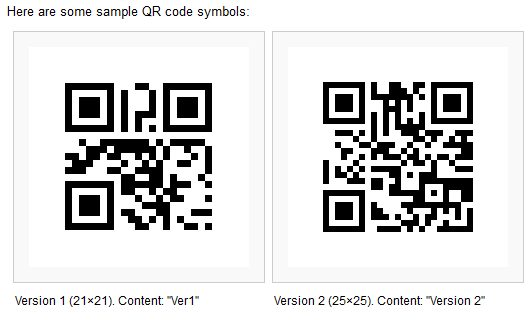
QR code (abbreviated from Quick Response Code) is the trademark for a type of matrix barcode (or two-dimensional barcode) first designed for the automotive industry in Japan. A barcode is an optically machine-readable label that is attached to an item and that records information related to that item. The information encoded by a QR code may be made up of four standardized types ("modes") of data (numeric, alphanumeric, byte / binary, Kanji) or, through supported extensions, virtually any type of data.
The QR Code system has become popular outside the automotive industry due to its fast readability and greater storage capacity compared to standard UPC barcodes. Applications include product tracking, item identification, time tracking, document management, general marketing, and much more.
A QR code consists of black modules (square dots) arranged in a square grid on a white background, which can be read by an imaging device (such as a camera) and processed using Reed-Solomon error correction until the image can be appropriately interpreted; data is then extracted from patterns present in both horizontal and vertical components of the image.

Invention

The QR code system was invented in 1994 by Toyota's subsidiary, Denso Wave. Its purpose was to track vehicles during manufacture; it was designed to allow high-speed component scanning. It has since become one of the most popular types of two-dimensional barcodes.

Standards

There are several standards that cover the encoding of data as QR codes:
  • 1 September 2006 – ISO/IEC 18004:2006 Information technology – Automatic identification and data capture techniques – QR code 2005 bar code symbology specification
    Defines QR code 2005 symbols, an extension of QR code model 2. Does not specify how to read QR code model 1 symbols, or require this for compliance.

At the application layer, there is some variation between most of the implementations. Japan's NTT DoCoMo has established de facto standards for the encoding of URLs, contact information, and several other data types. The open-source "ZXing" project maintains a list of QR code data types.

Uses

Originally designed for industrial uses, QR codes have become common in consumer advertising. Typically, a smartphone is used as a QR-code scanner, displaying the code and converting it to some useful form (such as a standard URL for a website, thereby obviating the need for a user to type it manually into a web browser).
"In the shopping industry, knowing what causes the consumers to be motivated when approaching products by the use of QR codes, advertisers and marketers can use the behavior of scanning to get consumers to buy, causing it to have the best impact on ad and marketing design." As a result, the QR code has become a focus of advertising strategy, since it provides quick and effortless access to the brand's website. Beyond mere convenience to the consumer, the importance of this capability is that it increases the conversion rate (that is, increases the chance that contact with the advertisement will convert to a sale), by coaxing qualified prospects further down the conversion funnel without any delay or effort, bringing the viewer to the advertiser's site immediately, where a longer and more targeted sales pitch may continue.
Although initially used to track parts in vehicle manufacturing, QR codes are now (as of 2012) used over a much wider range of applications, including commercial tracking, entertainment and transport ticketing, product/loyalty marketing (examples: mobile couponing where a company's discounted and percent discount can be captured using a QR code decoder which is a mobile app, or storing a company's information such as address and related information alongside its alpha-numeric text data as can be seen in Yellow Pages directory), and in-store product labeling. It can also be used in storing personal information for use by government. An example of this is Philippines National Bureau of Investigation (NBI) where NBI clearances now come with a QR code. Many of these applications target mobile-phone users (via mobile tagging). Users may receive text, add a vCard contact to their device, open a Uniform Resource Identifier (URI), or compose an e-mail or text message after scanning QR codes. They can generate and print their own QR codes for others to scan and use by visiting one of several pay or free QR code-generating sites or apps. Google had a popular API to generate QR codes, and apps for scanning QR codes can be found on nearly all smartphone devices.

QR codes storing addresses and Uniform Resource Locators (URLs) may appear in magazines, on signs, on buses, on business cards, or on almost any object about which users might need information. Users with a camera phone equipped with the correct reader application can scan the image of the QR code to display text, contact information, connect to a wireless network, or open a web page in the telephone's browser. This act of linking from physical world objects is termed hardlinking or object hyperlinking. QR codes also may be linked to a location to track where a code has been scanned. Either the application that scans the QR code retrieves the geo information by using GPS and cell tower triangulation (aGPS) or the URL encoded in the QR code itself is associated with a location.

Mobile operating systems

QR codes can be used in Google's Android, BlackBerry OS and Apple iOS devices (iPhone/iPod/iPad), as well as Microsoft's Windows Phone operating system, Google Goggles, 3rd party barcode scanners, and the Nintendo 3DS. The browser supports URL redirection, which allows QR codes to send metadata to existing applications on the device. mbarcode is a QR code reader for the Maemo operating system. In Apple's iOS, a QR code reader is not natively included, but more than fifty paid and free apps are available with both the ability to scan the codes and hard-link to an external URL. Google Goggles is an example of one of many applications that can scan and hard-link URLs for iOS and Android. BlackBerry 10 devices have a native QR reader as well as several third party readers. Windows Phone 7.5 is able to scan QR codes through the Bing search app.

URLs

URLs aided marketing conversion rates even in the pre-smartphone era but during those years faced several limitations: ad viewers usually had to type the URL and often did not have a web browser in front of them at the moment they viewed the ad. The chances were high that they would forget to visit the site later, not bother to type a URL, or forget what URL to type. Friendly URLs decreased these risks but did not eliminate them. Some of these disadvantages to URL conversion rates are fading away now that smartphones are putting web access and voice recognition in constant reach. Thus an advert viewer need only reach for his or her phone and speak the URL, at the moment of ad contact, rather than remember to type it into a PC later.

Virtual stores

During the month of June 2011, according to one study, 14 million mobile users scanned a QR code or a barcode. Some 58% of those users scanned a QR or barcode from their homes, while 39% scanned from retail stores; 53% of the 14 million users were men between the ages of 18 and 34. The use of QR codes for "virtual store" formats started in South Korea, and Argentina, but is currently expanding globally. Big companies such as Walmart, Procter & Gamble and Woolworths have already adopted the Virtual Store concept.

Code payments

QR codes can be used to store bank account information or credit card information, or they can be specifically designed to work with particular payment provider applications. There are several trial applications of QR code payments across the world.
In November 2012, QR code payments were deployed on a larger scale in the Czech Republic when an open format for payment information exchange - a Short Payment Descriptor - was introduced and endorsed by the Czech Banking Association as the official local solution for QR payments.

Website login

QR codes can be used to log in into websites: a QR Code is shown on the login page on a computer screen, and when a registered user scans it with a verified smartphone, they will automatically be logged in on the computer. Authentication is performed by the smartphone which contacts the server. Google tested such a login method in January 2012.

Design

Unlike the older, one-dimensional barcode that was designed to be mechanically scanned by a narrow beam of light, a QR code is detected by a 2-dimensional digital image sensor and then digitally analyzed by a programmed processor. The processor locates the three distinctive squares at the corners of the QR code image, using a smaller square (or multiple squares) near the fourth corner to normalize the image for size, orientation, and angle of viewing. The small dots throughout the QR code are then converted to binary numbers and validated with an error-correcting code.

Storage


The amount of data that can be stored in the QR code symbol depends on the datatype (mode, or input character set), version (1, …, 40, indicating the overall dimensions of the symbol), and error correction level. The maximum storage capacities occur for 40-L symbols (version 40, error correction level L)


Encryption

Encrypted QR codes, which are not very common, have a few implementations. An Android app, for example, manages encryption and decryption of QR codes using the DES algorithm (56 bits). The Japanese immigration system uses encrypted QR codes when issuing visa in passports  as shown in the figure here.

Error correction

Codewords are 8 bits long and use the Reed–Solomon error correction algorithm with four error correction levels. The higher the error correction level, the less storage capacity. The following table lists the approximate error correction capability at each of the four levels:

Level L (Low) 7% of codewords can be restored.
Level M (Medium) 15% of codewords can be restored.
Level Q (Quartile)        25% of codewords can be restored.
Level H (High) 30% of codewords can be restored.

In larger QR symbols, the message is broken up into several Reed–Solomon code blocks. The block size is chosen so that at most 15 errors can be corrected in each block; this limits the complexity of the decoding algorithm. The code blocks are then interleaved together, making it less likely that localized damage to a QR symbol will overwhelm the capacity of any single block.
Thanks to error correction, it is possible to create artistic QR codes that still scan correctly, but contain intentional errors to make them more readable or attractive to the human eye, as well as to incorporate colors, logos, and other features into the QR code block.

Encoding

The format information records two things: the error correction level and the mask pattern used for the symbol. Masking is used to break up patterns in the data area that might confuse a scanner, such as large blank areas or misleading features that look like the locator marks. The mask patterns are defined on a grid that is repeated as necessary to cover the whole symbol. Modules corresponding to the dark areas of the mask are inverted. The format information is protected from errors with a BCH code, and two complete copies are included in each QR symbol.

The message data is placed from right to left in a zigzag pattern, as shown below. In larger symbols, this is complicated by the presence of the alignment patterns and the use of multiple interleaved error-correction blocks.


License

The use of QR codes is free of any license. The QR code is clearly defined and published as an ISO standard.
Denso Wave owns the patent rights on QR codes, but has chosen not to exercise them. In the USA, the granted QR code patent is US 5726435, and in Japan JP 2938338. The European Patent Office granted patent "EPO 0672994". to Denso Wave, which was then validated into French, UK, and German patents, all of which are still in force as of November 2011.
The word QR code itself is a registered trademark of Denso Wave Incorporated. In UK, the trademark is registered as E921775, the word "QR Code", with a filing date of 03/09/1998. The UK version of the trademark is based on the Kabushiki Kaisha Denso (DENSO CORPORATION) trademark, filed as Trademark 000921775, the word "QR Code", on 03/09/1998 and registered on 6/12/1999 with the European Union OHIM (Office for Harmonization in the Internal Market). The U.S. Trademark for the word "QR Code" is Trademark 2435991 and was filed on 29 September 1998 with an amended registration date of 13 March 2001, assigned to Denso Corporation.

Risks

Malicious QR codes combined with a permissive reader can put a computer's contents and user's privacy at risk. This practice is known as "attagging", a portmanteau of "attack tagging". They are easily created and can be affixed over legitimate QR codes. On a smartphone, the reader's permissions may allow use of the camera, full Internet access, read/write contact data, GPS, read browser history, read/write local storage, and global system changes.

Risks include linking to dangerous web sites with browser exploits, enabling the microphone/camera/GPS, and then streaming those feeds to a remote server, analysis of sensitive data (passwords, files, contacts, transactions), and sending email/SMS/IM messages or DDOS packets as part of a botnet, corrupting privacy settings, stealing identity, and even containing malicious logic themselves such as JavaScript  or a virus. These actions could occur in the background while the user is only seeing the reader opening a seemingly harmless web page. In Russia, a malicious QR code caused phones that scanned it to send premium texts at a fee of US$6 each


Read more ...

July 17, 2013

Subscriber identity module(SIM)

Subscriber identity module(SIM)


A subscriber identity module or subscriber identification module (SIM) is an integrated circuit that securely stores the international mobile subscriber identity (IMSI) and the related key used to identify and authenticate subscribers on mobile telephony devices (such as mobile phones and computers).
A SIM circuit is embedded into a removable plastic card. This plastic card is called a "SIM card" and can be transferred between different mobile devices. A SIM card follows certain smart card standards. SIM cards were first made the same size as a credit card (85.60 mm × 53.98 mm × 0.76 mm). The development of physically smaller mobile devices prompted the development of a smaller SIM card, the mini-SIM card. Mini-SIM cards have the same thickness as full-size cards, but their length and width are reduced to 25 mm × 15 mm.
A SIM card contains its unique serial number (ICCID), international mobile subscriber identity (IMSI), security authentication and ciphering information, temporary information related to the local network, a list of the services the user has access to and two passwords: a personal identification number (PIN) for ordinary use and a personal unblocking code (PUK) for PIN unlocking.

History

The SIM was initially specified by the European Telecommunications Standards Institute in the specification with the number TS 11.11. This specification describes the physical and logical behaviour of the SIM. With the development of UMTS the specification work was partially transferred to 3GPP. 3GPP is now responsible for the further development of applications like SIM (TS 51.011) and USIM (TS 31.102) and ETSI for the further development of the physical card UICC.

The first SIM card was made in 1991 by Munich smart-card maker Giesecke & Devrient, who sold the first 300 SIM cards to the Finnish wireless network operator Radiolinja.

Design

SIM chip structure and packaging
There are three operating voltages for SIM cards: 5 V, 3 V and 1.8 V (ISO/IEC 7816-3 classes A, B and C, respectively). The operating voltage of the majority of SIM cards launched before 1998 was 5 V. SIM cards produced subsequently are compatible with 3 V and 5 V. Modern cards support 5 V, 3 V and 1.8 V.
The microcontrollers used for SIM cards come in different configurations. The typical ROM size is between 64 KB and 512 KB, typical RAM size is between 1 KB and 8 KB, and typical EEPROM size is between 16 KB and 512 KB. The ROM contains the operating system of the card and might contain applets where the EEPROM contains the so-called personalization, which consists of security keys, phone book, SMS settings, etc., and operating system patches.

Modern SIM cards allow applications to be loaded when the SIM is in use by the subscriber. These applications communicate with the handset or a server using SIM application toolkit, which was initially specified by 3GPP in TS 11.14 (there is an identical ETSI specification with different numbering). ETSI and 3GPP maintain the SIM specifications; the main specifications are: ETSI TS 102 223, ETSI TS 102 241, ETSI TS 102 588, and ETSI TS 131 111. SIM toolkit applications were initially written in native code using proprietary APIs. In order to allow interoperability of the applications, Java Card was taken as the solution of choice by ETSI. Additional standards and specifications of interest are maintained by Global Platform.

Data

SIM cards store network-specific information used to authenticate and identify subscribers on the network. The most important of these are the ICCID, IMSI, Authentication Key (Ki), Local Area Identity (LAI) and Operator-Specific Emergency Number. The SIM also stores other carrier-specific data such as the SMSC (Short Message Service Center) number, Service Provider Name (SPN), Service Dialing Numbers (SDN), Advice-Of-Charge parameters and Value Added Service (VAS) applications. (Refer to GSM 11.11)
SIM cards can come in various data capacities, from 32 KB to at least 128 KB. All allow a maximum of 250 contacts to be stored on the SIM, but while the 32 KB has room for 33 Mobile Network Codes (MNCs) or "network identifiers", the 64 KB version has room for 80 MNCs. This is used by network operators to store information on preferred networks, mostly used when the SIM is not in its home market but is roaming. The network operator that issued the SIM card can use this to have a SIM card connect to a preferred network in order to make use of the best price and/or quality network instead of having to pay the network operator that the SIM card 'saw' first. This does not mean that a SIM card can only connect to a maximum of 33 or 80 networks, but this means that the SIM card issuer can only specify up to that number of preferred networks, if a SIM is outside these preferred networks it will use the first or best available network.

ICCID

Each SIM is internationally identified by its integrated circuit card identifier (ICCID). ICCIDs are stored in the SIM cards and are also engraved or printed on the SIM card body during a process called personalisation. The ICCID is defined by the ITU-T recommendation E.118 as the Primary Account Number. Its layout is based on ISO/IEC 7812. According to E.118, the number is up to 19 digits long, including a single check digit calculated using the Luhn algorithm. However, the GSM Phase 1 defined the ICCID length as 10 octets (20 digits) with operator-specific structure.
The number is composed of the following subparts:
Issuer identification number (IIN)
Maximum of seven digits:
  • Major industry identifier (MII), 2 fixed digits, 89 for telecommunication purposes.
  • Country code, 1–3 digits, as defined by ITU-T recommendation E.164.
  • Issuer identifier, 1–4 digits.
Individual account identification
  • Individual account identification number. Its length is variable, but every number under one IIN will have the same length.
Check digit
  • Single digit calculated from the other digits using the Luhn algorithm.
With the GSM Phase 1 specification using 10 octets into which ICCID is stored as packed BCD, the data field has room for 20 digits with hexadecimal digit "F" being used as filler when necessary.
In practice, this means that on GSM SIM cards there are 20-digit (19+1) and 19-digit (18+1) ICCIDs in use, depending upon the issuer. However, a single issuer always uses the same size for its ICCIDs.
To confuse matters more, SIM factories seem to have varying ways of delivering electronic copies of SIM personalization datasets. Some datasets are without the ICCID checksum digit, others are with the digit.

As required by E.118, The ITU regularly publishes a list of all internationally assigned IIN codes in its Operational Bulletins. The most recent list, as of June 2012, is in Operational Bulletin No. 1005

International mobile subscriber identity (IMSI)

SIM cards are identified on their individual operator networks by a unique International Mobile Subscriber Identity (IMSI). Mobile network operators connect mobile phone calls and communicate with their market SIM cards using their IMSIs. The format is:
  • The first three digits represent the Mobile Country Code (MCC).
  • The next two or three digits represent the Mobile Network Code (MNC). Three-digit MNC codes are allowed by E.212 but are mainly used in the United States and Canada.
  • The next digits represent the Mobile Subscriber Identification Number (MSIN). Normally there will be 10 digits but would be fewer in the case of a 3-digit MNC or if national regulations indicate that the total length of the IMSI should be less than 15 digits.

Authentication key (Ki)

The Ki is a 128-bit value used in authenticating the SIMs on the mobile network. Each SIM holds a unique Ki assigned to it by the operator during the personalization process. The Ki is also stored in a database (termed authentication center or AuC) on the carrier's network.
The SIM card is designed not to allow the Ki to be obtained using the smart-card interface. Instead, the SIM card provides a function, Run GSM Algorithm, that allows the phone to pass data to the SIM card to be signed with the Ki. This, by design, makes usage of the SIM card mandatory unless the Ki can be extracted from the SIM card, or the carrier is willing to reveal the Ki. In practice, the GSM cryptographic algorithm for computing SRES_2 (see step 4, below) from the Ki has certain vulnerabilities that can allow the extraction of the Ki from a SIM card and the making of a duplicate SIM card.
Authentication process:
  1. When the Mobile Equipment starts up, it obtains the International Mobile Subscriber Identity (IMSI) from the SIM card, and passes this to the mobile operator requesting access and authentication. The Mobile Equipment may have to pass a PIN to the SIM card before the SIM card will reveal this information.
  2. The operator network searches its database for the incoming IMSI and its associated Ki.
  3. The operator network then generates a Random Number (RAND, which is a nonce) and signs it with the Ki associated with the IMSI (and stored on the SIM card), computing another number known as Signed Response 1 (SRES_1).
  4. The operator network then sends the RAND to the Mobile Equipment, which passes it to the SIM card. The SIM card signs it with its Ki, producing SRES_2, which it gives to the Mobile Equipment along with encryption key Kc. The Mobile Equipment passes SRES_2 on to the operator network.
  5. The operator network then compares its computed SRES_1 with the computed SRES_2 that the Mobile Equipment returned. If the two numbers match, the SIM is authenticated and the Mobile Equipment is granted access to the operator's network. Kc is used to encrypt all further communications between the Mobile Equipment and the network.

Location area identity


The SIM stores network state information, which is received from the Location Area Identity (LAI). Operator networks are divided into Location Areas, each having a unique LAI number. When the device changes locations, it stores the new LAI to the SIM and sends it back to the operator network with its new location. If the device is power cycled, it will take data off the SIM, and search for the prior LAI.

SMS messages and contacts

Most SIM cards will orthogonally store a number of SMS messages and phone book contacts. The contacts are stored in simple "name and number" pairs: entries containing multiple phone numbers and additional phone numbers will usually not be stored on the SIM card. When a user tries to copy such entries to a SIM the handset's software will break them up into multiple entries, discarding any information that is not a phone number. The number of contacts and messages stored depends on the SIM; early models would store as few as five messages and 20 contacts while modern SIM cards can usually store over 250 contacts.

Formats

SIM cards have been made smaller over the years; functionality is independent of format. Full-size SIMs were followed by mini-SIMs, micro-SIMs, and nano-SIMs. SIMs are also made to be embedded in devices.
 GSM SIM card showing full-size SIM card (1FF), Mini SIM card (2FF), Micro SIM card (3FF) and Nano SIM card (4FF)
 GSM SIM card showing full-size SIM card (1FF), Mini SIM card (2FF), Micro SIM card (3FF) and Nano SIM card (4FF)

full-size SIM

The first to appear was the full-size or 1FF (1st form factor), the size of a credit card (85.60 mm × 53.98 mm × 0.76 mm).

mini-SIM

The mini-SIM card has the same contact arrangement as the full-size SIM card and is normally supplied within a full-size card carrier, attached by a number of linking pieces. This arrangement (defined in ISO/IEC 7810 as ID-1/000) allows such a card to be used in a device requiring a full-size card, or in a device requiring a mini-SIM card after breaking the linking pieces.

micro-SIM

The later 3FF card or micro-SIM cards have the same thickness and contact arrangements, but the length and width are further reduced as above.
The micro-SIM was developed by the European Telecommunications Standards Institute (ETSI) along with SCP, 3GPP (UTRAN/GERAN), 3GPP2 (CDMA2000), ARIB, GSM Association (GSMA SCaG and GSMNA), GlobalPlatform, Liberty Alliance, and the Open Mobile Alliance (OMA) for the purpose of fitting into devices otherwise too small for a mini-SIM card.
The form factor was mentioned in the December 1998 3GPP SMG9 UMTS Working Party, which is the standards-setting body for GSM SIM cards, and the form factor was agreed upon in late 2003.
The micro-SIM was created for backward compatibility. The major issue with backward compatibility was the contact area of the chip. Retaining the same contact area allows the micro-SIM to be compatible with the prior, larger SIM readers through the use of plastic cutout surrounds. The SIM was also designed to run at the same speed (5 MHz) as the prior version. The same size and positions of pins resulted in numerous "How-to" tutorials and YouTube video with detailed instructions how to cut a mini-SIM card to micro-SIM size with a sharp knife or scissors. These tutorials became very popular among first owners of iPad 3G after its release on April 30, 2010, and iPhone 4 on June 24, 2010.
The chairman of EP SCP, Dr. Klaus Vedder, said
"With this decision, we can see that ETSI has responded to a market need from ETSI customers, but additionally there is a strong desire not to invalidate, overnight, the existing interface, nor reduce the performance of the cards. EP SCP expect to finalise the technical realisation for the third form factor at the next SCP plenary meeting, scheduled for February 2004."
The iPhone 4S, a minor revision of iPhone 4, as well as the Samsung Galaxy S3/S4, various Nokia Lumia handsets and the Nokia N9 used micro-sim cards.

nano-SIM

In early 2012, the nano-SIM or 4FF (4th form factor) was introduced, which measures 12.3 × 8.8 × 0.67 mm and reduces the previous format to the contact area while maintaining the existing contact arrangements. A small rim of isolating material is left around the contact area to avoid short circuits with the socket. The 0.7 mm thickness of the nano-SIM is about 15 percent less than its predecessor. 4FF can be put into adapters for use with devices taking 2FF or 3FF SIMs.
Nano-SIM cards were used by iPhone 5.

Embedded-SIM

SIMs for M2M applications are available in a surface mount SON-8 package which may be soldered directly onto a circuit board.
The surface mount format provides the same electrical interface as the full size, 2FF and 3FF SIM cards, but is soldered to the circuit board as part of the manufacturing process. In M2M applications where there is no requirement to change the SIM card, this avoids the requirement for a connector, improving reliability and security.

Table of SIM cards


Developments

When GSM was already in use the specifications were further developed and enhanced with functionality like SMS, GPRS, etc. These development steps are referred as releases by ETSI. Within this development cycles the SIM specification was enhanced as well: new voltage classes, formats and files were introduced. In GSM-only times, the SIM consisted of the hardware and the software. With the advent of UMTS this naming was split: the SIM was now an application and hence only software. The hardware part was called UICC. This split was necessary because UMTS introduced a new application, the Universal Subscriber Identity Module (USIM). The USIM brought among other things security improvements like the mutual authentication and longer encryption keys and an improved address book.
"SIM cards" in developed countries are today usually UICCs containing at least a SIM and a USIM application. This configuration is necessary because older GSM only handsets are solely compatible with the SIM [application] and some UMTS security enhancements do rely on the USIM [application].
The equivalent of SIM on CDMA networks is the R-UIM (and the equivalent of USIM is CSIM).
A virtual SIM is a mobile phone number provided by a mobile network operator that does not require a SIM card to connect phone calls to a user's mobile phone.

SIM and carriers

The SIM card introduced a new and significant business opportunity for MVNOs - mobile virtual network operators - who lease capacity from one of the network operators rather than owning or operating a cellular telecoms network, and only provide a SIM card to their customers. MVNOs first appeared in Denmark, Hong Kong, Finland and the UK. Today they exist in over 50 countries, including most of Europe, United States, Canada, Australia and parts of Asia, and account for approximately 10% of all mobile phone subscribers around the world.
On some networks, the mobile phone is locked to its carrier SIM card, meaning that the phone only works with SIM cards from the specific carrier. This is more common in markets where mobile phones are heavily subsidised by the carriers, and the business model depends on the customer staying with the service provider for a minimum term (typically 12 or 24 months). SIM cards that are issued by providers with an associated contract are called Sim only deals. Common examples are the GSM networks in the United States, Canada, Australia, the UK and Poland. Many businesses offer the ability to remove the SIM lock from a phone, effectively making it possible to then use the phone on any network by inserting a different SIM card. Mostly, GSM and 3G mobile handsets can easily be unlocked and used on any suitable network with any SIM card.
In countries where the phones are not subsidised, e.g., India and Belgium, all phones are unlocked. Where the phone is not locked to its SIM card, the users can easily switch networks by simply replacing the SIM card of one network with that of another while using only one phone. This is typical, for example, among users who may want to optimise their carrier's traffic by different tariffs to different friends on different networks, or when traveling internationally.

SIMware

SIMware is software held on or running on a SIM card.


Read more ...

July 14, 2013

Windows 8

Windows 8


Windows 8 is a version of Microsoft Windows (an operating system developed by Microsoft) for use on personal computers, including home and business desktops, laptops, tablets, and home theater PCs. Development of Windows 8 started before the release of its predecessor, Windows 7, in 2009. It was announced at CES 2011, and followed by the release of three pre-release versions from September 2011 to May 2012. The operating system was released to manufacturing on August 1, 2012, and was released for general availability on October 26, 2012.
Windows 8 introduces significant changes to the operating system's platform, primarily focused towards improving its user experience on mobile devices such as tablets to better compete with other mobile operating systems like Android and Apple's iOS. Windows 8 features a new touch user interface and shell based on Microsoft's "Metro" design language, featuring a new Start screen with a grid of dynamically updating tiles that represent applications. The Start screen replaces the "Start menu" of earlier Windows versions. There is a new app platform with an emphasis on touchscreen input, and the new Windows Store to obtain and/or purchase applications to run on the operating system.
In addition, Windows 8 takes advantage of new or emerging technologies like USB 3.0, 4Kn Advanced Format, near field communications, cloud computing, and the low-power ARM architecture. It includes new security features such as built-in antivirus capabilities, a new installation process optimized for digital distribution, and support for secure boot (a UEFI feature which allows operating systems to be digitally signed to prevent malware from altering the boot process). Synchronization of certain apps and settings between multiple devices is supported.
Windows 8 was released to mixed reception. Although reaction towards its performance improvements, security enhancements, and improved support for touchscreen devices was positive, the new user interface of the operating system has been widely criticized for being potentially confusing and difficult to learn (especially when used with a keyboard and mouse instead of a touchscreen). Despite these shortcomings, 60 million Windows 8 licenses have been sold through January 2013. This includes upgrades and sales to OEMs for new PCs.
Windows 8.1 is scheduled for release in late 2013 and, according to Microsoft, will change "key aspects" of how Windows 8 is used,  including the reinstatement of the Start button.


Developer
Microsoft Corporation
Website windows.microsoft.com
Releases
Initial release August 1, 2012; 11 months ago
General
availability
October 26, 2012; 8 months ago
Latest stable
release
6.2 (Build 9200) (August 1, 2012; 11 months ago) 
Latest preview
release
6.3 (Build 9431) 
License Proprietary commercial software
Kernel type Hybrid
Update method Windows Update
Platform support IA-32, x64, and ARM
Preceded by Windows 7 (2009)
Support status
  • Start date: October 30, 2012
  • Mainstream support: Until January 9, 2018
  • Extended support: Until January 10, 2023

Development history

Windows 8 development started before Windows 7 had shipped in 2009. At the Consumer Electronics Show in January 2011, Microsoft announced that the next version of Windows would add support for devices with ARM microprocessors, and showcased an early version of what would become Windows 8, NT 6.2 build 7867, running on several prototype ARM devices. Details also began to surface about a new application framework for Windows 8 codenamed "Jupiter", which would be used to make "immersive" applications using XAML (similarly to Windows Phone and Silverlight) that could be distributed via a new packaging system and a rumored app store.
Three milestone releases of Windows 8 leaked to the general public. Milestone 1, Build 7850, was leaked on April 12, 2011. It was the first build where the text of a window was written centered instead of aligned to the left. It was also probably the first appearance of the Metro-style font, and its wallpaper had the text shhh... let's not leak our hard work. However, its detailed build number reveals that the build was created on September 22, 2010. The leaked copy edition was Enterprise edition. The OS still reads as "Windows 7". Milestone 2, Build 7955, was leaked on April 25, 2011. The traditional Blue Screen of Death (BSoD) was replaced by a new Black screen, although this was later scrapped. This build introduced a new ribbon in Windows Explorer. Build 7959, with minor changes but the first 64-bit version, was leaked on May 1, 2011. The "Windows 7" logo was temporarily replaced with text displaying "Microsoft Confidential". On June 17, 2011, build 7989 64-bit edition was leaked. It introduced a new boot screen featuring the same fish as the default Windows 7 Beta wallpaper, which was later scrapped, and the circling dots as featured in the final (although the final version comes with smaller circling dots throbber). It also had the text Welcome below them, although this was also scrapped.
On June 1, 2011, Microsoft unveiled Windows 8's new user interface as well as additional features at both Computex Taipei and the D9: All Things Digital conference in California.
The "Building Windows 8" blog launched on August 15, 2011, featuring details surrounding Windows 8's features and its development process.

Windows Store apps

Windows 8 introduces a new style of application, Windows Store apps. According to Microsoft developer Jensen Harris, these apps are to be optimized for touchscreen environments and will be more specialized than current desktop applications. Apps can run either in a full-screen mode, or be snapped to the side of a screen. Apps can provide toast notifications on screen or animate their tiles on the Start screen with dynamic content. Apps can use "contracts"; a collection of hooks to provide common functionality that can integrate with other apps, such as search and sharing. Apps can also provide integration with other services; for example, the People app can connect to a variety of different social networks and services (such as Facebook, Skype, and People service), while the Photos app can aggregate photos from services such as Facebook and Flickr.
Windows Store apps run within a new set of APIs known as the Windows Runtime, which supports programming languages such as C, C++, VB.NET, C#, along with HTML5 and JavaScript. Depending on the language used, apps written for Windows Runtime can be compatible with both Intel and ARM versions of Windows. Components may be compiled as Windows Runtime Components, permitting consumption by all of the Windows Runtime supported languages. To ensure stability and security, apps run within a sandboxed environment, and require permissions to access certain functionality, such as accessing the Internet or a camera.
Retail versions of Windows 8 will be able to install these apps only through the Windows Store—a namesake distribution platform which offers both apps, and listings for desktop programs certified for comparability with Windows 8. A method to sideload apps from outside the Windows Store is available to devices running Windows 8 Enerprise and joined to a domain; Windows 8 Pro and Windows RT devices that are not part of a domain can also sideload apps, but only after special product keys are obtained through volume licensing.
The term "Immersive app" had been used internally by Microsoft developers to refer to the apps prior to the first official presentation of Windows 8, after which they were referred to as "Metro-style apps" in reference to the Metro design language. The term was phased out in August 2012; a Microsoft spokesperson denied rumors that the change was related to a potential trademark issue, and stated that "Metro" was only a codename that would be replaced prior to Windows 8's release. Following these reports, the terms "Modern UI-style apps", "Windows 8-style apps" and "Windows Store apps" began to be used by various Microsoft documents and material to refer to the new apps. In an interview on September 12, 2012, Soma Somasegar (vice president of Microsoft's development software division) confirmed that "Windows Store apps" would be the official term for the apps.

Web browsers

Exceptions to the restrictions faced by Windows Store apps are given to web browsers; the user's default browser can provide a "New experience enabled" (formerly "Metro-style enabled") version that runs within the "Metro" shell like other apps. Web browser apps are distributed alongside desktop web browsers, and also have access to functionality unavailable to other apps, such as being able to permanently run in the background, use multiple background processes, and use Windows API code instead of WinRT (allowing for code to be re-used with the desktop version, while still taking advantage of WinRT features such as contracts to integrate with charms).
The developers of both Chrome and Firefox committed to developing versions of their browsers to run in this environment; while Chrome's "Windows 8 mode" uses the existing desktop interface, Firefox's Metro version (which is currently available in development builds) uses a touch-optimized interface inspired by the Android version of Firefox.

Interface and desktop

Windows 8 introduces significant changes to the operating system's user interface, many of which are aimed at improving its experience on tablet computers and other touchscreen devices. The new user interface is based on Microsoft's Metro design language, and uses a Start screen similar to that of Windows Phone as the primary means of launching applications. The Start screen displays a customizable array of tiles linking to various apps and desktop programs, some of which can display constantly updated information and content through "live tiles". As a form of multi-tasking, apps can be snapped to the side of a screen. Alongside the traditional Control Panel, a new simplified and touch-optimized settings app known as "PC Settings" is used for basic configuration and user settings. It does not include many of the advanced options still accessible from the normal Control Panel.
A vertical toolbar known as the charms (accessed by swiping from the right edge of a touchscreen, or pointing the cursor at hotspots in the right corners of a screen) provides access to system and app-related functions, such as search, sharing, device management, settings, and a Start button. The traditional desktop environment for running desktop applications is accessed via a tile on the Start screen. The Start button on the taskbar has been removed in favor of the Start charm and a hotspot in the lower-left corner of the screen, which displays a large tooltip displaying a thumbnail of the Start screen. Swiping from the left edge of a touchscreen or clicking in the top-left corner of the screen allows one to switch between apps and the Desktop. Pointing the cursor in the top-left corner of the screen and moving down reveals a thumbnail list of active apps. Aside from the removal of the Start button, the desktop on Windows 8 is similar to that of Windows 7, except that the Aero Glass theme has been replaced by a flatter, solid-colored design inspired by the Metro interface.

Secure boot

Windows 8 supports a feature of the UEFI specification known as "Secure boot", which uses a public-key infrastructure to verify the integrity of the operating system and prevent unauthorized programs such as bootkits from infecting the device.
Microsoft faced criticism (particularly from free software supporters) for mandating that devices receiving its optional certification for Windows 8 have secure boot enabled by default using a key provided by Microsoft. Concerns were raised that secure boot could prevent or hinder the use of alternate operating systems such as Linux. In response to the criticism, Microsoft developer Tony Mangefeste stated that "At the end of the day, the customer is in control of their PC. Microsoft's philosophy is to provide customers with the best experience first, and allow them to make decisions themselves."
Microsoft's certification requirements eventually revealed that UEFI firmware on x86 systems must allow users to re-configure or turn off secure boot, but that this must not be possible on ARM-based systems (Windows RT). Microsoft faced further criticism for its decision to restrict Windows RT devices by using this functionality. Tom Warren, in an article on The Verge, said that other smartphones and tablets are typically sold in a locked-down state. No mandate is made regarding the installation of third-party certificates that would enable running alternative software.

Removed features

Several notable features have been removed in Windows 8, beginning with the traditional Start menu. Support for playing DVDs has been removed from Windows Media Player due to the cost of licensing the necessary decoders (especially for devices which do not include optical disc drives at all) and the prevalence of streaming services such as Netflix. For the same reasons, Windows Media Center will no longer be included by default on Windows 8, but the software (which also includes support for DVD playback) can be purchased in the "Pro Pack" (for the base version of Windows 8, which also upgrades the system to Windows 8 Pro) or "Media Center Pack" (for Windows 8 Pro) add-ons. Windows 8 will still support third-party DVD playback software.
Backup and Restore, the former backup app of Windows, is deprecated. It still ships with Windows 8 and continues to work on preset schedules, but is pushed to the background and can only be accessed through a Control Panel applet called "Windows 7 File Recovery". Shadow Copy, a component of Windows Explorer that once saved previous versions of changed files, no longer protects local files and folders. It can only access previous versions of shared files stored on a Windows Server computer. The subsystem on which these components worked, however, is still available for other software to use.

Hardware requirements

PCs


The minimum system requirements for Windows 8 are slightly higher than those of Windows 7. The CPU must support the Physical Address Extension (PAE), NX bit, and SSE2. Windows Store apps require a screen resolution of 1024×768 or higher to run. They require a screen resolution of 1366×768 or higher for snap functionality. To receive certification, Microsoft requires candidate x86 systems to resume from standby in 2 seconds or less.

Minimum hardware requirements for Windows 8


Tablets and convertibles

Microsoft released minimum hardware requirements for new tablet and convertible devices certified for Windows 8, and defined a convertible form factor as a standalone device that combines the PC, display and rechargeable power source with a mechanically attached keyboard and pointing device in a single chassis. A convertible can be transformed into a tablet where the attached input devices are hidden or removed leaving the display as the only input mechanism. On March 12, 2013, Microsoft amended its certification requirements to only require that screens on tablets have a minimum resolution of 1024×768 (down from the previous 1366×768). The amended requirement is intended to allow "greater design flexibility" for future products.Tablets and convertibles

Hardware certification requirements for Windows tablets


Software compatibility

The three desktop editions of Windows 8 are sold in two sub-editions: 32-bit and 64-bit. The 32-bit sub-edition runs on CPUs compatible with x86 architecture 3rd generation (known as IA-32) or newer, and can run 32-bit and 16-bit applications, although 16-bit support must be enabled first. (16-bit applications are developed for CPUs compatible with x86 2nd generation, first conceived in 1978. Microsoft started moving away from this architecture since Windows 95.)
The 64-bit sub-edition runs on CPUs compatible with x86 8th generation (known as x86-64, or x64) or newer, and can run 32-bit and 64-bit programs. 32-bit programs and operating system are restricted to supporting only 4 gigabytes of memory while 64-bit systems can theoretically support 2048 gigabytes of memory. 64-bit operating systems require a different set of device drivers than those of 32-bit operating systems.

Windows RT, the only edition of Windows 8 for systems with ARM processors, only supports applications included with the system (such as a special version of Office 2013), supplied through Windows Update, or Windows Store apps, to ensure that the system only runs applications that are optimized for the architecture. Windows RT does not support running IA-32 or x64 applications. Windows Store apps can either support both the x86 and ARM architectures, or compiled to support a specific architecture.

Read more ...

June 16, 2013

Android (operating system)

Android (operating system)


Android is a Linux-based operating system designed primarily for touchscreen mobile devices such as smartphones and tablet computers. Initially developed by Android, Inc., which Google backed financially and later bought in 2005, Android was unveiled in 2007 along with the founding of the Open Handset Alliance: a consortium of hardware, software, and telecommunication companies devoted to advancing open standards for mobile devices. The first Android-powered phone was sold in October 2008.
Android is open source and Google releases the code under the Apache License. This open source code and permissive licensing allows the software to be freely modified and distributed by device manufacturers, wireless carriers and enthusiast developers. Additionally, Android has a large community of developers writing applications ("apps") that extend the functionality of devices, written primarily in a customized version of the Java programming language. In October 2012, there were approximately 700,000 apps available for Android, and the estimated number of applications downloaded from Google Play, Android's primary app store, was 25 billion.

These factors have contributed towards making Android the world's most widely used smartphone platform,overtaking Symbian in the fourth quarter of 2010, and the software of choice for technology companies who require a low-cost, customizable, lightweight operating system for high tech devices without developing one from scratch. As a result, despite being primarily designed for phones and tablets, it has seen additional applications on televisions, games consoles, digital cameras and other electronics. Android's open nature has further encouraged a large community of developers and enthusiasts to use the open source code as a foundation for community-driven projects, which add new features for advanced users or bring Android to devices which were officially released running other operating systems.
Android had a worldwide smartphone market share of 75% during the third quarter of 2012, with 750 million devices activated in total and 1.5 million activations per day. The operating system's success has made it a target for patent litigation as part of the so-called "smartphone wars" between technology companies. As of May 2013, a total of 900 million Android devices have been activated and 48 billion apps have been installed from the Google Play store.


History

Android, Inc. was founded in Palo Alto, California in October 2003 by Andy Rubin (co-founder of Danger), Rich Miner (co-founder of Wildfire Communications, Inc.), Nick Sears (once VP at T-Mobile), and Chris White (headed design and interface development at WebTV) to develop, in Rubin's words "smarter mobile devices that are more aware of its owner's location and preferences". The early intentions of the company were to develop an advanced operating system for digital cameras, when it was realised that the market for the devices was not large enough, and diverted their efforts to producing a smartphone operating system to rival those of Symbian and Windows Mobile (Apple's iPhone had not been released at the time). Despite the past accomplishments of the founders and early employees, Android Inc. operated secretly, revealing only that it was working on software for mobile phones. That same year, Rubin ran out of money. Steve Perlman, a close friend of Rubin, brought him $10,000 in cash in an envelope and refused a stake in the company.

Google acquired Android Inc. on August 17, 2005, making it a wholly owned subsidiary of Google. Key employees of Android Inc., including Rubin, Miner and White, stayed at the company after the acquisition. Not much was known about Android Inc. at the time, but many assumed that Google was planning to enter the mobile phone market with this move. At Google, the team led by Rubin developed a mobile device platform powered by the Linux kernel. Google marketed the platform to handset makers and carriers on the promise of providing a flexible, upgradable system. Google had lined up a series of hardware component and software partners and signaled to carriers that it was open to various degrees of cooperation on their part.

Android's user interface is based on direct manipulation, using touch inputs that loosely correspond to real-world actions, like swiping, tapping, pinching and reverse pinching to manipulate on-screen objects. The response to user input is designed to be immediate and provides a fluid touch interface, often using the vibration capabilities of the device to provide haptic feedback to the user. Internal hardware such as accelerometers, gyroscopes and proximity sensors are used by some applications to respond to additional user actions, for example adjusting the screen from portrait to landscape depending on how the device is oriented, or allowing the user to steer a vehicle in a racing game by rotating the device, simulating control of a steering wheel.
Android devices boot to the homescreen, the primary navigation and information point on the device, which is similar to the desktop found on PCs. Android homescreens are typically made up of app icons and widgets; app icons launch the associated app, whereas widgets display live, auto-updating content such as the weather forecast, the user's email inbox, or a news ticker directly on the homescreen. A homescreen may be made up of several pages that the user can swipe back and forth between, though Android's homescreen interface is heavily customisable, allowing the user to adjust the look and feel of the device to their tastes. Third party apps available on Google Play and other app stores can extensively re-theme the homescreen, and even mimic the look of other operating systems, such as Windows Phone. Most manufacturers, and some wireless carriers, customise the look and feel of their Android devices to differentiate themselves from their competitors.

Present along the top of the screen is a status bar, showing information about the device and its connectivity. This status bar can be "pulled" down to reveal a notification screen where apps display important information or updates, such as a newly received email or SMS text, in a way that does not immediately interrupt or inconvenience the user. In early versions of Android these notifications could be tapped to open the relevant app, but recent updates have provided enhanced functionality, such as the ability to call a number back directly from the missed call notification without having to open the dialer app first. Notifications are persistent until read or dismissed by the user.

Applications


Play Store on the Nexus 4
Android has a growing selection of third party applications, which can be acquired by users either through an app store such as Google Play or the Amazon Appstore, or by downloading and installing the application's APK file from a third-party site. The Play Store application allows users to browse, download and update apps published by Google and third-party developers, and is pre-installed on devices that comply with Google's compatibility requirements. The app filters the list of available applications to those that are compatible with the user's device, and developers may restrict their applications to particular carriers or countries for business reasons. Purchases of unwanted applications can be refunded within 15 minutes of the time of download, and some carriers offer direct carrier billing for Google Play application purchases, where the cost of the application is added to the user's monthly bill. As of September 2012, there were more than 675,000 apps available for Android, and the estimated number of applications downloaded from the Play Store was 25 billion.
Applications are developed in the Java language using the Android software development kit (SDK). The SDK includes a comprehensive set of development tools, including a debugger, software libraries, a handset emulator based on QEMU, documentation, sample code, and tutorials. The officially supported integrated development environment (IDE) is Eclipse using the Android Development Tools (ADT) plugin. Other development tools are available, including a Native Development Kit for applications or extensions in C or C++, Google App Inventor, a visual environment for novice programmers, and various cross platform mobile web applications frameworks.

In order to work around limitations on reaching Google services due to Internet censorship in the People's Republic of China, Android devices sold in the PRC are generally customized to use state approved services instead.

Development

Android is developed in private by Google until the latest changes and updates are ready to be released, at which point the source code is made available publicly.This source code will only run without modification on select devices, usually the Nexus series of devices.With others, there are proprietary binaries which have to be provided by the manufacturer in order for Android to work.

Linux


Architecture diagram
Android consists of a kernel based on Linux kernel version 2.6 and, from Android 4.0 Ice Cream Sandwich onwards, version 3.x, with middleware, libraries and APIs written in C, and application software running on an application framework which includes Java-compatible libraries based on Apache Harmony. Android uses the Dalvik virtual machine with just-in-time compilation to run Dalvik 'dex-code' (Dalvik Executable), which is usually translated from Java bytecode. The main hardware platform for Android is the ARM architecture. There is support for x86 from the Android-x86 project, and Google TV uses a special x86 version of Android. In 2013, Freescale announced Android on its i.MX processor, i.MX5X and i.MX6X series.

Android's Linux kernel has further architecture changes by Google outside the typical Linux kernel development cycle. Android does not have a native X Window System by default nor does it support the full set of standard GNU libraries, and this makes it difficult to port existing Linux applications or libraries to Android. Support for simple C and SDL applications is possible by injection of a small Java shim and usage of the JNI like, for example, in the Jagged Alliance 2 port for Android.

Update schedule


From left to right: HTC Dream (G1), Nexus One, Nexus S, Galaxy Nexus
Google provides major updates, incremental in nature, to Android every six to nine months, which most devices are capable of receiving over the air. The latest major update is Android 4.2 Jelly Bean.

Compared to its chief rival mobile operating system, namely iOS, Android updates are typically slow to reach actual devices. For devices not under the Nexus brand, updates often arrive months from the time the given version is officially released. This is caused partly due to the extensive variation in hardware of Android devices, to which each update must be specifically tailored, as the official Google source code only runs on their flagship Nexus devices. Porting Android to specific hardware is a time- and resource-consuming process for device manufacturers, who prioritize their newest devices and often leave older ones behind.Hence, older smartphones are frequently not updated if the manufacturer decides it is not worth their time, regardless of whether the phone is capable of running the update. This problem is compounded when manufacturers customize Android with their own interface and apps, which must be reapplied to each new release. Additional delays can be introduced by wireless carriers who, after receiving updates from manufacturers, further customize and brand Android to their needs and conduct extensive testing on their networks before sending the update out to users.

Market share and rate of adoption

Research company Canalys estimated in the second quarter of 2009 that Android had a 2.8% share of worldwide smartphone shipments. By the fourth quarter of 2010 this had grown to 33% of the market, becoming the top-selling smartphone platform. By the third quarter of 2011 Gartner estimated that more than half (52.5%) of the smartphone market belongs to Android. By the third quarter of 2012 Android had a 75% share of the global smartphone market according to the research firm IDC.
In July 2011, Google said that 550,000 new Android devices were being activated every day, up from 400,000 per day in May, and more than 100 million devices had been activated with 4.4% growth per week. In September 2012, 500 million devices had been activated with 1.3 million activations per day. In May 2013, at Google I/O, Sundar Pichai announced that 900 million Android devices had been activated.
Android market share varies by location. In July 2012, Android's market share in the United States was 52%, and rose to 90% in China.

Usage share of Android versions


Usage share of the different versions collected during a 14-day period ending on May 1, 2013
Usage share of the different versions as of June 3, 2013.

Version Code name Release date API level Distribution (June 3, 2013)
4.2.x Jelly Bean November 13, 2012 17 4.0%
4.1.x Jelly Bean July 9, 2012 16 29.0%
4.0.x Ice Cream Sandwich December 16, 2011 15 25.6%
3.2 Honeycomb July 15, 2011 13 0.1%
3.1 Honeycomb May 10, 2011 12 0%
2.3.3–2.3.7 Gingerbread February 9, 2011 10 36.4%
2.3–2.3.2 Gingerbread December 6, 2010 9 0.1%
2.2 Froyo May 20, 2010 8 3.2%
2.0–2.1 Eclair October 26, 2009 7 1.5%
1.6 Donut September 15, 2009 4 0.1%
1.5 Cupcake April 30, 2009 3 0%

Beyond smartphones and tablets


The Sony SmartWatch: an example of how Android is used on electronics other than smartphones and tablets
The open and customizable nature of Android allows it to be used on other electronics, including laptops and netbooks, smartbooks smart TVs (Google TV) and cameras (Nikon Coolpix S800c and Galaxy Camera). In addition, the Android operating system has seen applications on smart glasses (Google Glass), wristwatches, headphones, car CD and DVD players, mirrors, portable media players and landlines and Voice over IP phones. Ouya, an upcoming videogames console running Android, became one of the most successful Kickstarter campaigns, crowdfunding US$8.5m for its development, and was later followed by other Android-based video games consoles such as Project Shield from Nvidia.
In 2011, Google demonstrated "Android@Home", a new home automaton technology which uses Android to control a range of household devices including light switches, power sockets and thermostats.Prototype light bulbs were announced that could be controlled from an Android phone or tablet, but Android head Andy Rubin was cautious to note that "turning a lightbulb on and off is nothing new," pointing to numerous failed home automation services. Google, he said, was thinking more ambitiously and the intention was to use their position as a cloud services provider to bring Google products into customers' homes.
Read more ...
Designed By Published.. Blogger Templates